Drown a piano in a big hall. Make a bass growl. Put a pad on a worn old record. With the latest update, every instrument on MILO can be changed by applying effects, and the Mixer View has become the Effects View.
Try it in ten seconds
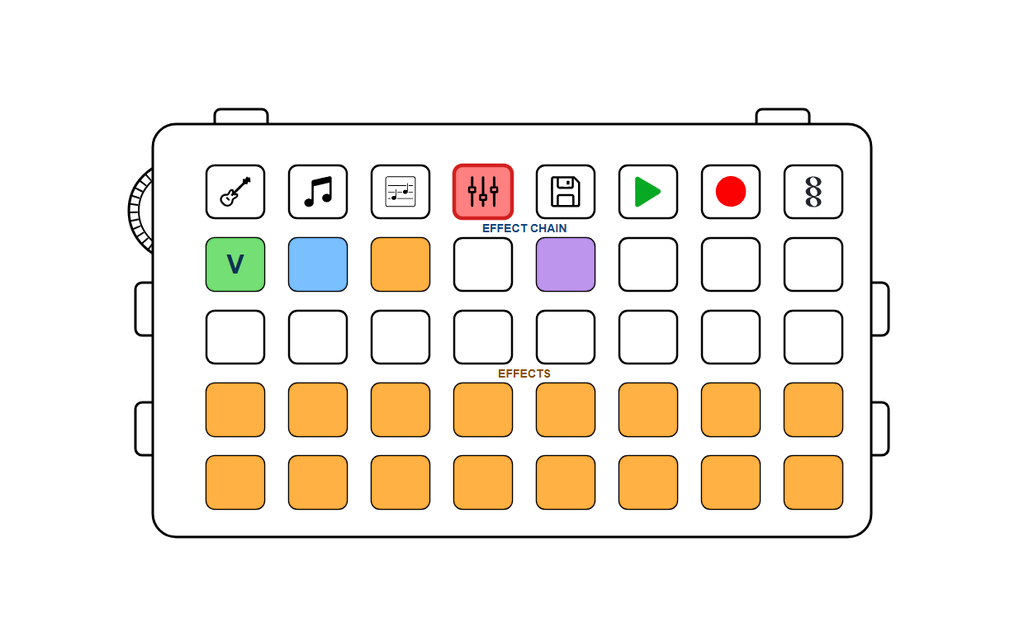
- Press the Effects button, the one with the sliders on it.
- Press any key in the bottom two rows. You hear a note through that effect.
- Like it? Keep holding it and tap a free key in the top rows. It’s now on your instrument.
- Hold it there and turn the wheel for more or less.
It gets better with your song playing: hold any effect in the bottom rows and you hear your instrument through it. Let go, and it’s back to normal. Nothing changes until you place it.
What’s in there
- Space Effects: a reverb that goes from a small room to a big hall, and a delay that echoes in time with your song.
- Motion Effects: tremolo, pump, chorus, flanger, auto filter and touch wah make your sound pulse, swirl and sweep, most of them in time with your beat.
- Grit Effects: drive, from warm crunch to hard fuzz, warm for a fat bass and kick drum, a wavefolder for glassy, bell-like tones, and lofi for that worn record, crackle included.
- Shape Effects: a filter for muffled or thin, an envelope for slow swells or tight chops, a compressor that makes everything denser, and a formant that makes your sound talk.
How to get it
Update MILO on the Firmware Update page, press the Effects button and start playing. Made something you like? Share it on the MILO Songs page.
Leave a Reply